> ## Documentation Index
> Fetch the complete documentation index at: https://docs.gable.ai/llms.txt
> Use this file to discover all available pages before exploring further.
# Services & Data Components
> How services and data stores are represented in Gable, and how to add, edit, and delete data store components
Gable represents your systems as two kinds of components:
* **Code components (services)** — created automatically when Gable scans a service's source code. A code component contains the service's ingresses (data entry points), egresses (data exit points), and the paths and field mappings that connect them.
* **Data store components** — user-authored components that represent materialized data assets, such as database tables, Kafka streams, files, or other persisted stores that participate in lineage. They can be added to Gable when the asset is not created automatically through static code analysis but still needs to be represented in the lineage graph.
This page covers managing data store components. It does not cover creating cross-service edges or managing in-service paths and overrides — see [Dependencies (Cross-Service Edges)](/docs/onboarding/dependencies) and [Field Mappings & Overrides](/docs/onboarding/field-mappings-and-overrides).
## Add a data store
1. Open **Lineage Explorer**.
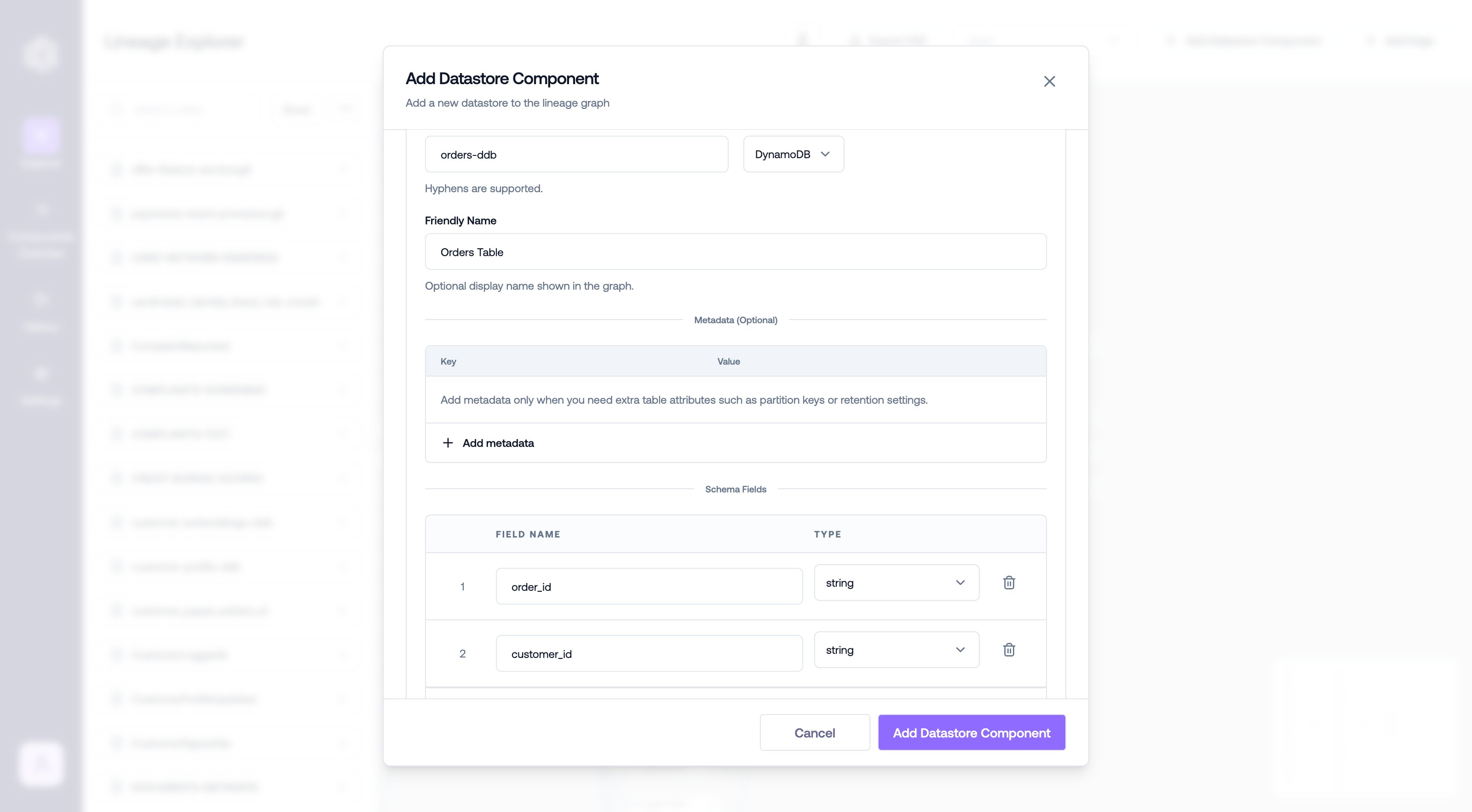
2. Select **Add Datastore Component**.
3. In the modal, enter the data store details.
4. Add the table, schema, or field information required for the data store.
5. Additional freeform metadata can be added via the optional metadata section.
6. Click **Save**.
 Data store components can also be created and updated programmatically — see the [`gable lineage datastore`](/docs/cli/lineage/datastore) CLI commands.
## Edit a data store
1. Select the data store component you want to update.
2. Select **Edit Component**.
3. Update the data store details.
4. Click **Save Changes**.
After saving, the updated data store information is visible in Lineage Explorer.
## Delete a data store
Delete a data store when it should no longer be represented in Lineage Explorer.
1. Open **Lineage Explorer**.
2. Select the data store component you want to remove.
3. Select **Delete**.
4. Confirm the deletion.
After deletion, the data store component is no longer visible in Lineage Explorer.
Before deleting a data store, confirm that the component is no longer needed. There will be a warning if the data store has any connected edges. If a data store with connected edges is deleted, those edges will continue to exist but the connection will be broken.
***
## Publishing data store schemas automatically
Data store schema components can also be published automatically from schema files in your repository — for example, whenever `.avsc` or `.proto` files change. See the [auto-publish guide](/docs/resources/auto-publish-datastore-schemas).
Data store components can also be created and updated programmatically — see the [`gable lineage datastore`](/docs/cli/lineage/datastore) CLI commands.
## Edit a data store
1. Select the data store component you want to update.
2. Select **Edit Component**.
3. Update the data store details.
4. Click **Save Changes**.
After saving, the updated data store information is visible in Lineage Explorer.
## Delete a data store
Delete a data store when it should no longer be represented in Lineage Explorer.
1. Open **Lineage Explorer**.
2. Select the data store component you want to remove.
3. Select **Delete**.
4. Confirm the deletion.
After deletion, the data store component is no longer visible in Lineage Explorer.
Before deleting a data store, confirm that the component is no longer needed. There will be a warning if the data store has any connected edges. If a data store with connected edges is deleted, those edges will continue to exist but the connection will be broken.
***
## Publishing data store schemas automatically
Data store schema components can also be published automatically from schema files in your repository — for example, whenever `.avsc` or `.proto` files change. See the [auto-publish guide](/docs/resources/auto-publish-datastore-schemas).