> ## Documentation Index
> Fetch the complete documentation index at: https://docs.gable.ai/llms.txt
> Use this file to discover all available pages before exploring further.
# Field-Level Lineage Metadata
> Read the metadata Gable captures for each field mapping, from the Known dependencies table down to the code path steps
For each field mapping in a component — how an input field becomes an output field — Gable captures metadata describing how the mapping was derived, what happens to the value, and where it flows. This metadata appears in the **Known dependencies** section of the Component Details page, and expands into a step-by-step view of the code path.
## The Known dependencies table
The **Known dependencies** section lists each field mapping as a row — the **Ingress field** that enters the service on the left, the **Egress field** it becomes on the right — along with the following metadata columns:
* **Kind** — how the input participates in producing the output: **Data flow** (the value itself flows through), **Key-value bridge** (connected through a shared key), or **Control flow** (the value influences what is written without becoming it).
* **Computation** — what the code does to the value along the way: **Pass-through** (the value is carried unchanged), **Calculation** (the value is computed or transformed), or **Redaction** (the value is masked or removed).
* **Sources** — the number of upstream sources that feed the input field.
* **Consumers** — the number of downstream consumers of the output field.
* **Source** — where the mapping came from: **Scan output** (detected by Gable's analysis), **Override** (added or edited by a person), or **Disabled** (a scanned mapping that has been suppressed).
* **Tags** — the sensitivity or data tags on the fields, such as PII. See [Data Tagging](/docs/tracing/data-tagging).
* **Status** — when you are comparing two versions, whether the mapping was **added**, **changed**, or **removed**. See [Reviewing Version Changes](/docs/impact/version-changes).
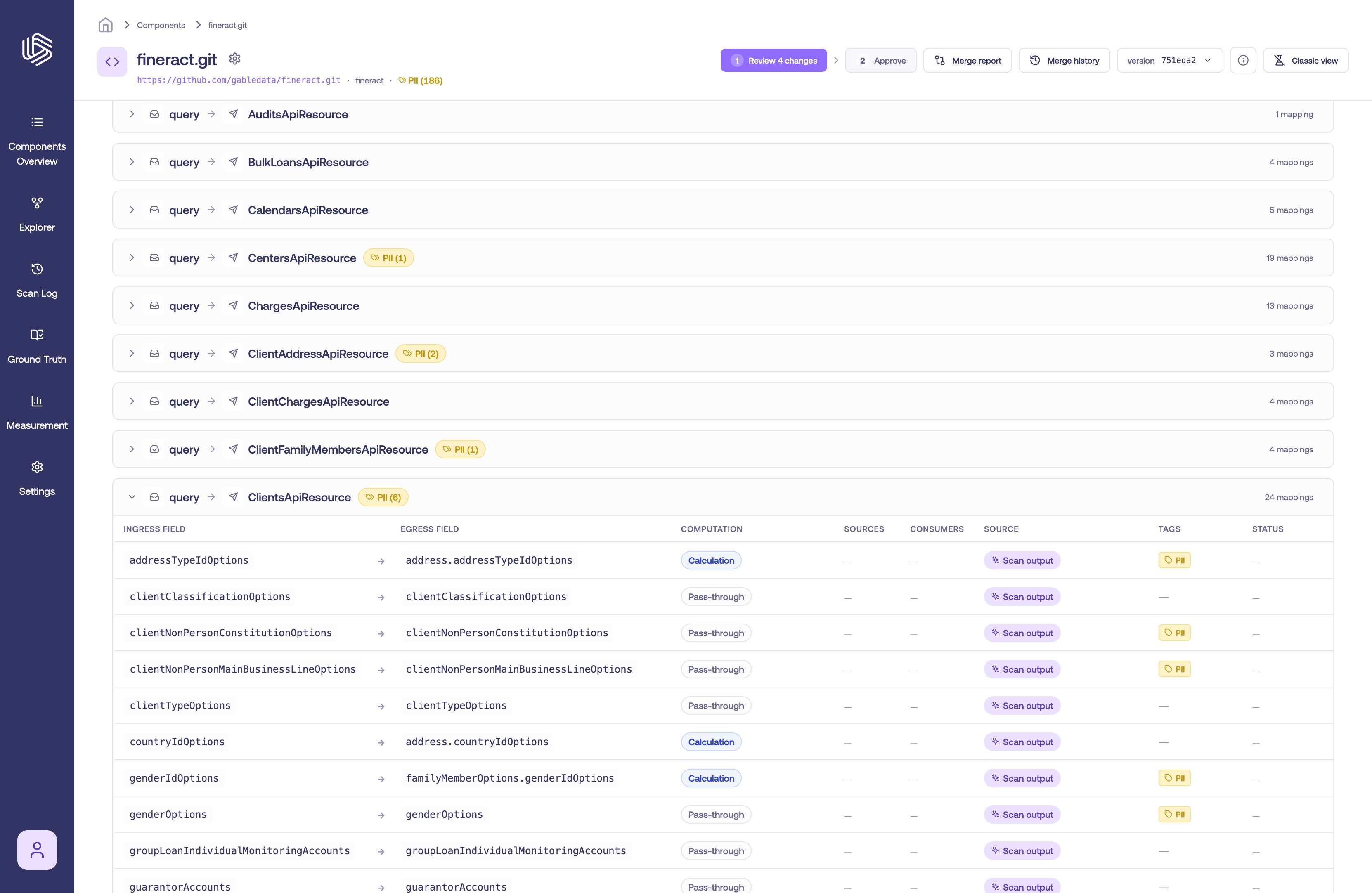 Note the difference between **Sources** (the *count* of upstream sources) and **Source** (the provenance of the mapping — scan output, override, or disabled).
## Inspect a mapping
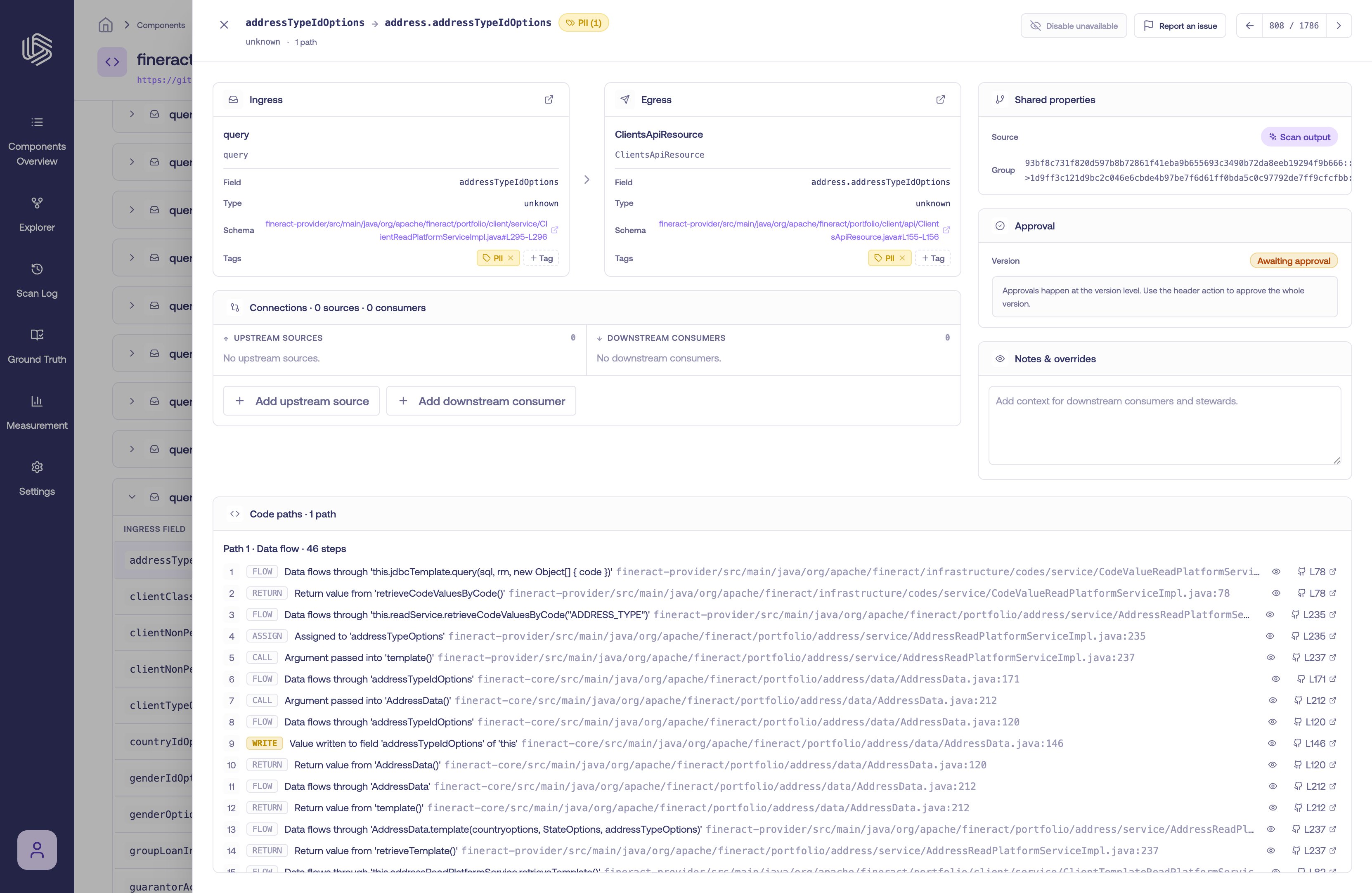
Select a row to open its details panel. The panel shows the ingress and egress fields, their connections (upstream sources and downstream consumers), any tags and notes, and the **Code paths** that produced the mapping.
Note the difference between **Sources** (the *count* of upstream sources) and **Source** (the provenance of the mapping — scan output, override, or disabled).
## Inspect a mapping
Select a row to open its details panel. The panel shows the ingress and egress fields, their connections (upstream sources and downstream consumers), any tags and notes, and the **Code paths** that produced the mapping.
 ## Code path steps
The **Code paths** card shows how the value actually travels through the code, as one or more paths. Each path is an ordered list of numbered **steps**, and each step describes a single operation.
Every step includes:
* **A classification** of the operation — for example **read**, **write**, **call**, **return**, **assign**, or **flow** — so you can see what the code is doing at that point.
* **A location** — the file and line where the operation occurs.
* **A human-readable summary** — a plain-language description of the transformation happening at that step, when one is available.
* **An inline code snippet** — expand a step to view the relevant source inline.
* **A link to GitHub** — open the exact line in your repository (labeled with the line number, e.g. `L42`).
## Code path steps
The **Code paths** card shows how the value actually travels through the code, as one or more paths. Each path is an ordered list of numbered **steps**, and each step describes a single operation.
Every step includes:
* **A classification** of the operation — for example **read**, **write**, **call**, **return**, **assign**, or **flow** — so you can see what the code is doing at that point.
* **A location** — the file and line where the operation occurs.
* **A human-readable summary** — a plain-language description of the transformation happening at that step, when one is available.
* **An inline code snippet** — expand a step to view the relevant source inline.
* **A link to GitHub** — open the exact line in your repository (labeled with the line number, e.g. `L42`).
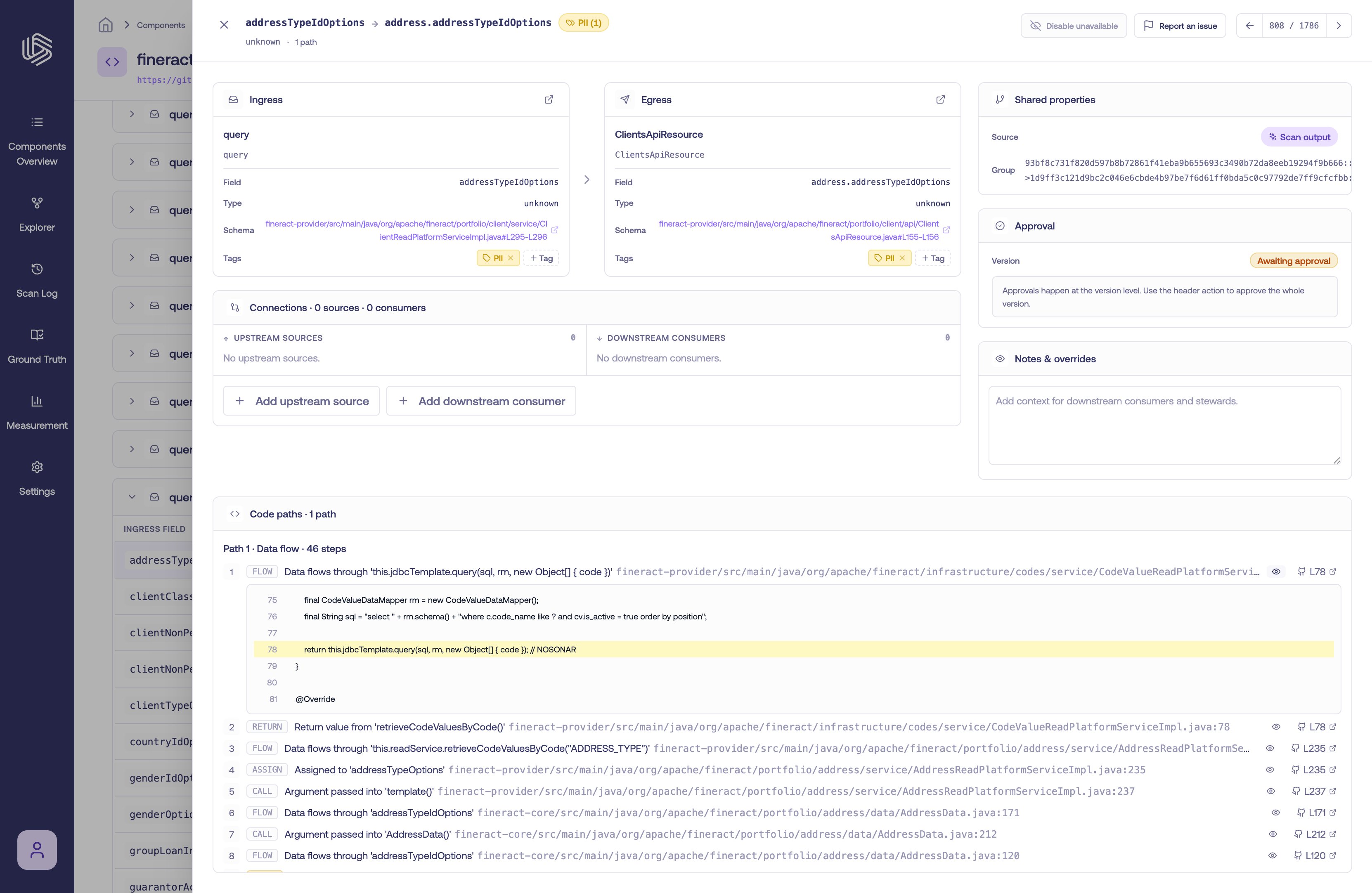 Reading the steps in order shows the full journey of the value: where it is read, how it is transformed, and where it is written.
To follow a field beyond a single component — across services, end to end — see [Tracing Data Lineage](/docs/tracing/end-to-end-lineage).
Reading the steps in order shows the full journey of the value: where it is read, how it is transformed, and where it is written.
To follow a field beyond a single component — across services, end to end — see [Tracing Data Lineage](/docs/tracing/end-to-end-lineage).