

- General repository scan — traces field-level data flows through your application.
- Agent project scan — analyzes LangChain agent projects to discover agents, tools, models, workflow relationships, and the field-level data flows they capture.
What you need
- Docker installed and running. Confirm with
docker info. - A local copy of the repository you want to scan. Gable analyzes code on disk, so the repository must be checked out on the machine running the image.
- Your Gable API key and endpoint. Repository scans upload their results to Gable, so the container needs your Gable credentials. Both are on Settings → API.
- One LLM authentication option. Gable uses an LLM to enhance its static analysis. You can authenticate with an OpenAI or Anthropic API key, or with a ChatGPT/Codex or Claude subscription. Pick one — each option is covered in Run the scan.
1. Download the image
Sign in to the Gable web console and go to Settings → API. At the bottom of the page is the Gable CLI Docker access section, which holds the credentials and commands for your account.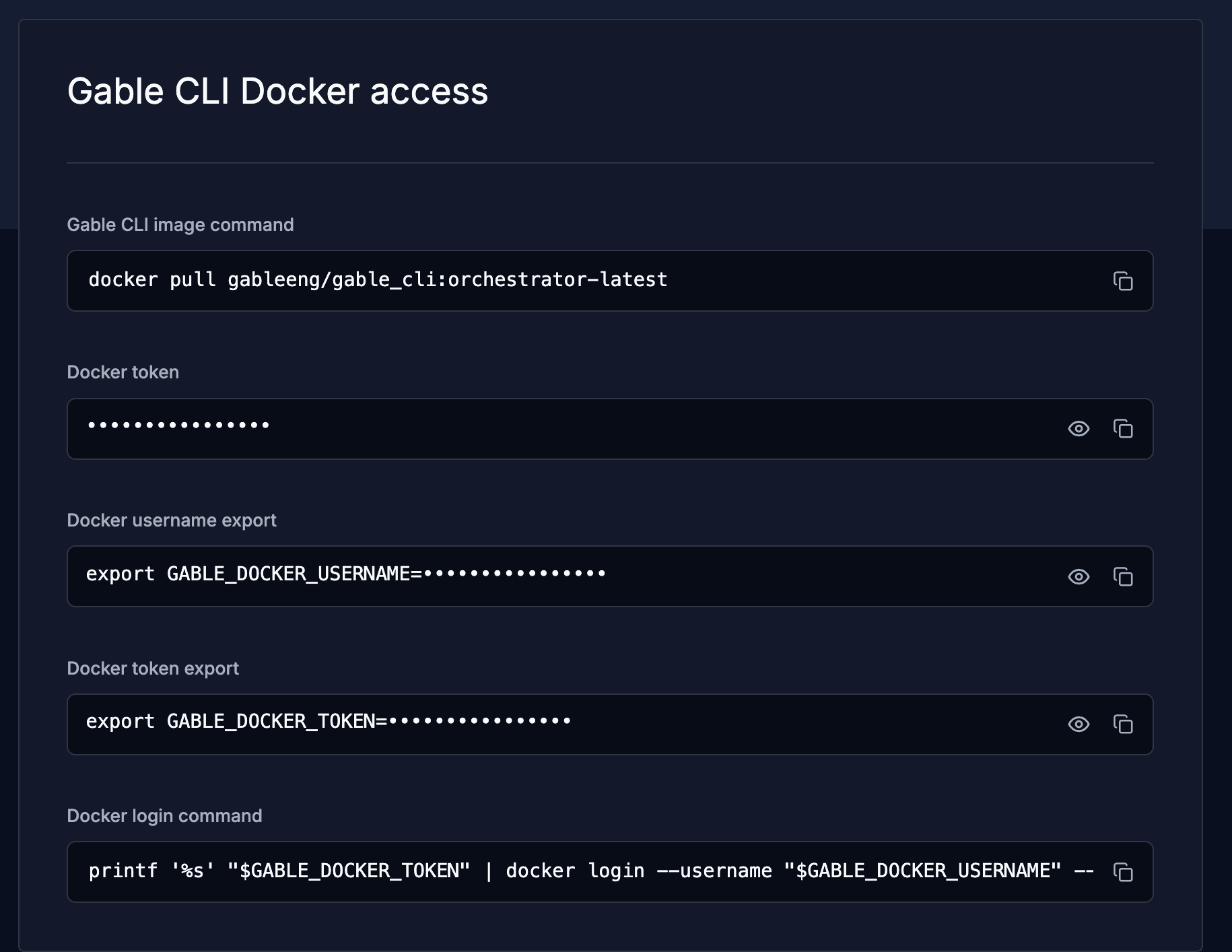
The Gable CLI Docker access section on the Settings → API page
- Docker username export — sets
GABLE_DOCKER_USERNAME - Docker token export — sets
GABLE_DOCKER_TOKEN - Docker login command — authenticates Docker using those two variables
- Gable CLI image command — pulls the latest Gable CLI image
The exports and the login command must run in the same terminal window, since
the login command reads the two variables the exports set. The Docker
token field shows the raw token on its own if you need it for a credential
store or CI secret.
2. Go to your project
Change into the local copy of the repository you want analyzed./workspace, and results are written to a gable_results/ directory in your project folder.
Run the commands from the root of the repository you want scanned. If you are
not sure where you are, check with
pwd.3. Choose a profile
The--profile flag selects the kind of scan and the model provider. Use the profile that matches your scan and the LLM you authenticate with.
OpenAI is the default model provider and uses
Sol 6.1. When Claude is the provider, Opus 5.5 is used.
4. Set your Gable API credentials
Repository scans upload their results to Gable. Copy your API key and endpoint from Settings → API and export them so they can be passed into the container:5. Run the scan
Use the section below that matches the LLM authentication option you chose. Each one shows the command for both scan types.OpenAI API key
Obtain a key from the OpenAI API dashboard and export it asCODEX_API_KEY so it can be passed into the container.
OpenAI with a ChatGPT subscription
If you have the ChatGPT desktop app or the Codex CLI installed and signed in with a ChatGPT subscription, you can use that subscription instead of an API key. The Codex login is stored in${CODEX_HOME:-$HOME/.codex}/auth.json; mount that directory into the container so the CLI can read it.
Repository scan:
Anthropic API key
Obtain a key from the Claude Console and export it asANTHROPIC_API_KEY.
Claude with a Claude subscription
If you have a Claude subscription and Claude Code installed, you can use that subscription instead of an API key. Generate a token with Claude Code:CLAUDE_CODE_OAUTH_TOKEN:
6. View your results
When the run finishes, the result files are written togable_results/ in your project folder.
Agent project scans produce agent-systems.json, which contains the agentic discovery results — agent systems, components, relationships, and lineage. Several metadata files are written alongside it as outputs of the analysis:
strands.jsonstrand-metadata.jsonframework-metadata.json
Troubleshooting
Image download denied. Repeat the Docker login using fresh credentials from the Gable CLI Docker access section of Settings → API. Nothing was analyzed, or the wrong code was analyzed. Runpwd to confirm you are at the root of the project you want scanned. Every command analyzes the current directory.
LLM authentication or model error. Confirm the key or token you exported is still valid, that it is present in the shell you are running from, and that the selected model is available to your account.
Unrecognized option. Pull the image again to pick up the latest version, and confirm the version with your Gable team. Agent scans use --profile agent for both providers; select Claude with --default-model-provider claude-cli.